Wednesday, June 1, 2011

Blog has moved

If this post is showing up in your blog reader, you need to update your feed. Subscribe through feedburner at: http://feeds.feedburner.com/timwingfield/JaFt

This particular version of the blog will live on at http://family-truckster.blogspot.com, however won't be updated after this post.

The domain hasn't change, my blog still lives at http://blog.timwingfield.com but in the move from blogger to jekyll, the feed moved.

Tim

Wednesday, May 11, 2011

Estimation Rant

Estimation rant

Estimation is a bad word on dev teams. We have learned from many painful estimation debacles to the point we cringe when we hear the word, "Estimate." In many software endeavors estimating is a necessary practice, at least on some levels, to get the thumbs up to start writing software in the first place. But just because we have done estimating activities often, does not mean we are good at it.

Disclaimer: I am discussing estimation in the context of delivery, not sales. Clients everywhere want to know when something will be done before they commit money to it, which is why many talented sales people drive fancy cars.

Failing Into the Hours Trap

The very first failure of many estimating exercises is estimating your tasks, stories, and features in hours - or days or weeks or years. Any unit of time measurement is likely going to get you in trouble, but we will stick with hours for our example. Yes, hours fit neatly into a column in Microsoft project, but for estimating a development effort your setting yourself up for failure as soon as you choose hours as your unit of measure.

Dages estimation

The first trap in using hours is we are all going to base that guesstimate on the 8 hour work day. If you commit to 8 hours, you are essentially saying that you will have that feature done in a day. Your manager is definitely hearing "one day" when you say 8 hours. If you could sit and code for 8 hours straight, maybe that estimate would be worthwhile. But how often do you get to code 8 straight hours? All kinds of things happen that derail that 8 hour day of uninterrupted coding. The stand up, other meetings, lunch, nature will inevitably call, and there's a better than average chance a Nerf war will break out in many team rooms.

The second trap of hours is they really only get used as a measurement when you go over your estimate. For example...

Let's take a developer on our team, we'll call him Jeff. In our estimation meeting, the team has determined that feature #1337 will take 16 hours to complete. Based on our previous trap we all just heard, "Two days." Jeff pulls feature #1337 off the board Monday morning and gets to work. Wednesday afternoon, he moves it to dev complete. Whoa, that feature just took 24 hours to complete! Come on, Jeff, you're 8 hours over the estimate? How will we ever make that time up?? We're on a deadline here!!

Sorry...all accusations are purely hypothetical.

The next Monday morning we're back at work, and our trusty developer Jeff looks on the board and sees feature #1355 on the board estimated at 16 hours. He pulls the card into the development queue and gets to work on it. At the end of the day he's done. 8 hours into his 16 hour feature he moves it to dev complete. Way to go Jeff!! You rock! Best developer ever!!

But hold on a second. Our rock star dev has missed his estimate by 50% in both cases. In one he's the villain and the other the hero? He goofed by 50% but thanks to "beating the hours" on the second feature that gets lost. In reality we should be asking Jeff why he missed each estimate. That will help us learn where we as a team missed and how we can apply that to future guesstimation exercises.

The Cost of Estimation

During a lunch conversation at a past conference I listened to a gentleman tell us how he was contracted to do a 6 month estimation on what it would cost to build a certain piece of software. Two weeks into the contract, one that was paying him quite well, he went to his stakeholders and said, "The amount of money you are sinking into the estimation contract will never be returned to you. You will never get $1 back from it, how about I just start building the software and we'll see where we are in 5 and a half months?" They went for it, and he won the development contract 5 and a half months later.

The estimate means nothing to the actual delivery of the software. One of my former managers used to say, "The effort is the effort is the effort." The iron triangle of software is scope, timeline, and quality. We're allowed to fix any two of them, but the third has to be flexible. (It's scary how many times quality is the one that gets forced to flex.) Our estimate won't change any of the three points on the iron triangle.

All Is Not Lost

Fear not, there are ways to get your software written without falling into estimation traps, and giving those outside the team a reasonable idea of when something will be delivered.

First up is story points. Story points are a representation of the level of effort the team thinks it will take to complete a story. Story points can be anything. I have seen teams use numbers such as 1, 3, 5, and 8 as their points, and other teams will use t-shirt sizes such as S, M, L as points. One team I saw REALLY wanted to drive home the fact that story points are relative, so they went with duck, unicorn, and elephant as their sizes. Using any of those units of measurement illustrates that story points are used relative to each other rather than to a fixed value such as hours. Humans are very good at doing comparisons, so we don't know exactly how big a unicorn story is, but we know an elephant story is bigger.

Another way to step away from estimations is to move to a continuous flow system. Get yourself a Kanban board, get rid of iterations and iteration commitments, and start tracking the cycle time on the completed side of things. There are a few challenges with going this way, the first being that you will not have a reasonable idea of your cycle time until you have pulled a few stories through the system. Additionally sizing may still come into play because stories have this habit of never being exactly the same size. But, get through a few cycles, get some actual times on features from concept to completion, and you'll be handing your managers actual times from which they can plan future work. It may take a little time to get the data, but there isn't a manager in an IT department anywhere that wouldn't love to hear, "This story is sized as a small for our team and small features take us about 2 days to complete. Come back Wednesday, we should have it for you."

The last way to get rid of estimation is just to get rid of estimation. Like the story where the gentleman stopped researching on the estimation contract and just started writing code, just write the freakin' code! That could make for some difficult conversations at some point, but if your 4 person dev team is in a 2 hour estimation meeting every iteration, that's 8 hours you could have spent writing code towards a deliverable.

</rant>

Thursday, April 21, 2011

How We Do a Retrospective

Hard hats required

There is no one right way to do a retrospective, there are many good techniques...and a few bad ones. Utilizing more than one technique is a good way to get different conversations going with your team, and expose different areas that could use a little fixin'. That said, I do have a "tried and true" technique that we've used on a number of teams over the years. It's usually pretty good at getting the conversation going, and can be done in 30 minutes or less to keep you from being stuck in "yet another meeting."

First things first, at the start of any retrospective you should review the action items or results from the previous iteration's retrospective. Have the people assigned to each item report how it went and what got accomplished. Nothing gets a retro off to a good start like saying, "Remember that problem we had last week? It's fixed!"

A Few Supplies and a Little Preparation

We're going to need:

  1. Three colors of sticky notes. Regular square ones will work fine. For this example we're going to use purple, yellow, and green.
  2. A box of pens, preferably all the same kind. I like to use sharpies because big pens on small paper ensures we get short items on each card rather than essays. Using the same pen also keeps things a little more anonymous.
  3. A whiteboard. In the absence of a whiteboard the big easel sheets would do the trick.
  4. A timer of some kind. I picked a timer up for about $200...it also makes phone calls, surfs the web, plays Angry Birds and sends text messages and email. It's high end for a timer, but it does the trick.

For the prep work, take our three colors of sticky notes and split them up so each member of the team has a few of each color. The number really doesn't matter, but we usually end up with 6 to 8 of each color for each person. Give each member of the team their own little pile of sticky notes and a sharpie.

Gather The Data

The colors signify good, bad, and confusing items from the previous iteration. Since we went with purple, yellow, and green we'll say that purple = pain, yellow = confusing, and green = good. Set the timer for 5 minutes and have the team write as many items as they can think of for each color from the previous iteration. They should do this on their own, writing their own thoughts down, we'll collaborate and discuss later. If your team is smaller and iterations are pretty short, put less than 5 minutes on the clock.

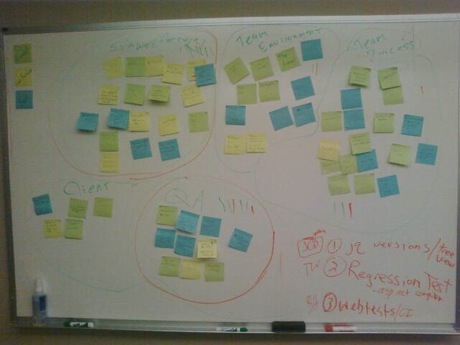
When the time is up, have each team member walk to the white board and stick their notes on the board. No order to them, just get them on the wall. Once all the stickies are on the wall, take a couple of volunteers to group them by subject, not by color. We're not looking for all the bad things that happened in one cluster, we're after what was good and bad about a given subject to the team. Aim for 4 to 8 categories, and try not to get them too broad. Once you have your categories, circle them and put a one or two word title above the cluster. It should look something like this...

Retro board

Discuss

We've got things broken down, next up we have to decide what we're going to tackle. Best way to do this is to Dot Vote. Dot voting is an old stand by in agile. Each team member gets 2 or 3 votes and they place a dot next to the category they want to discuss. If they think a category is very important they could put all three of their dots next to that category. We do want each team member to use their votes though, abstaining isn't allowed.

When everybody has voted we'll discuss the top two vote getters and try to pull an action item or two out of each category. Do a quick run through of each sticky, set the timer at 10 to 15 minutes, and get to discussing. Try to involve everybody in the discussion as well. Since everybody contributed to the stickies on the wall it should be easy to get the quieter folks to speak up as they likely added a note to the category.

What Are the Goals Here?

Goal numero uno in this set up is to get everybody to put stickies on the wall with what they thought went good or bad or confused them during the last iteration. By doing this we have everybody involved in the retrospective right away, and increases the likelihood of them speaking up during the discussion.

The second thing we're after is discussing categories of issues rather than smaller issues raised by one person. The goal of any retrospective is to look back and see what we can do to make the whole team better, not just what the loudest, type A personality, Alpha-Dev wants fixed to make his life better. By categorizing everybody's issues we can compare what everybody thinks, discuss the broader issue, and derive a good actionable, assignable action item from that.

Some Issues: Learn From My Mistakes

Doing this, or any, retrospective style 6 or 8 or 10 retrospectives in a row will stop yielding good results. That happened with one of my teams and we kind of got in a rut. Once in that rut the retrospective became an "Airing of Grievances" (minus the festivus pole) and we weren't getting good action items. In reality, we were getting bad attitudes towards the retrospective and incremental change was not coming our way.

One particular retrospective we had done the categorizing and completed our voting and a sticky note from one member of the team had not made it into a category we were going to discuss. In order to get it discussed, the owner of the sticky moved it into a category we were going to talk about. It was posed to the team if we should leave it, and the consensus was it wasn't there for the voting, it shouldn't go in now. The offender wasn't too happy with this decision and slapped it back in to be discussed...at which time one of us removed it, tore it up, and threw it away. Team over individual in the retro. Always.

As noted earlier, and solidified with my first issue above, this isn't the only way to do a retrospective and it shouldn't be used iteration after iteration. However, it does get the conversation going and it will usually yield an item or two that your team wants out of its way. Give it a shot the next time you have a retrospective.

Tuesday, April 19, 2011

Action Items Round Two

In my last post I discussed keeping your action items assignable and actionable. In the days since that post went out, I've seen a few more things to add to the subject of action items. We're agile, we're all about continuous improvement.

Action Items Are To Improve Team Workflow

Film chalkboard

Action items are things the team agrees to try in their next iteration to improve a process which is giving them trouble. In otherwords the team has identified a problem in how they're getting their work done and the action item they've decided on should help fix that problem. Some examples of action items I've seen on team boards in the past...

  1. Add Work In Progress limits to our scrum board.
  2. Make our Product Owner the single point of contact for our field engineers to limit the context switching of developers.
  3. Add a large, red light outside our team area to let the rest of the office know that the team is in heads down "quiet time" and shan't be interrupted.
  4. Try planning poker at our next planning meeting.

If the item would go straight to the value stream of your project, meaning it's something you are going to work on that will apply directly to your deliverable, then I usually don't classify it as an action item. Things that gostraight to your deliverable are typically specific features, setting up hardware, and technical spikes. (More on those in a sec.)

Not every retrospective will yield action items and that's OK. If you're doing short iterations and are humming right along, you may have a very short retrospective and be pretty happy with how everything went. There's nothing wrong with NOT having a problem on your team.

Technical Spikes

Spikes are meant to answer a question and should be time boxed. This stems from a couple things we as developers are very good at: Taking too long to come up with an answer and going off in the weeds, down a number of tangents and returning with what we think is the absolute perfect solution. Enter the technical spike. Limit our off in the weeds time, give us a definite end time, and force us to come up with A solution prior to coding it into the PERFECT solution.

Why don't I think spikes are action items? Because in the long run they should be answering a question about something that will likely go straight to the value stream of the project. Usually we're answering a question about some portion of code that's new to us, a framework we haven't used before, or something along those lines. These questions need to be answered for us to deliver our product, not necessarily to improve the team, its process and its flow. (Though not delivering our product will most decidedly have a negative impact on the team.)

An an example of what I mean, I have a spike assigned to me right now to look into a GUI testing framework for our project. This is clearly a question for us, and not something that I need to do to improve the next iteration and beyond. It's something that will provide direct value to our client.

So, let's say I finish my spike and settle on Selenium as our GUI testing framework of choice. After three or four iterations we see that our selenium tests are getting quite large and out of hand, at that point the team would probably identify an action item to clean those tests up. (And we would of course assign a steward to oversee that clean up.)

The Working Agreement

In my last post I got a very good comment from Fanlan:

At my company, we distinguish between tasks (Action items) and working agreements. "We will do a peer (code) review when we think we have finished a user story" is an example of a working agreement.

Many of the teams I've been on we haven't been too explicit with our working agreements, though I think that's a mistake on our part as I do like being more explicit about team workings. Leaving things open for interpretation rarely goes the way you wanted it interpreted, so I do like Fanlan's suggestion here.

In my example our team was going to try out code reviews and added them as an action item for the next iteration. In that context we don't know if code reviews will work for us or not, so we're going to run with incremental change and see how it goes. In another example we may want to add WIP limits to our team board, but after a couple of iterations they may not change our flow. If all goes well with our action items then I'd add the new practices explicitly to that working agreement for the team, but we should go through the "try before we buy" period before full adoption by the team.

Incremental change is a big deal in making your teams and your deliverables go better. Work at those retrospectives and their resulting action items, you'll see those improvements start to take hold.

Thursday, April 14, 2011

Action Items: The Results of the Retrospective

One of the principles of agile is incremental change. Looking inward on what your team is doing that could be better is one way to get that incremental change, and team retrospectives are a great way to do that looking inward. If you're not familiar with team retrospectives, essentially they're a fairly informal gathering where teams bring up issues and kudos over recent work and decide on a few things that they want to improve. The things they decide to improve are usually called Action Items.

Having been on a few agile teams and taken place in many a retrospective there are a couple of things that come to mind in regards to action items.

Make Your Action Items Actionable

Ok, that sounds a little on the obvious side, and it can be. But it's a very real problem with many action items.

A team gathers and they find an issue with their code. For example our team is working on a large, old code base. There are many pieces of it that are just scary to change. So the team brings this up at the retrospective. Many people have issues on the board such as, "code is scary to change." Or something like "our code is difficult to work with." And since it's a dev team somebody has probably taken a little initiative and just put, "Code SUCKS!" up on the board. After some discussion the team has decided on an action item of: Improve the Code.

The whole team is there, managers, product owners, QA folks, everybody, and they settle on "Improve the Code" with some gusto. This is an item we KNOW we need to do and the whole team is behind it. If we're going to succeed, we need to IMPROVE THE CODE!

But our (somewhat) hypothetical team has missed the important part of this action item: HOW do we improve the code? Just saying "improve the code" is the dev team equivalent of saying, "Well, duh." We're always striving to improve the code, but what's that first step? Make sure your action items are indeed items and not overall team goals.

Drag the discussion a bit further. Start asking questions when you settle on a broad action item such as this. If you start digging, you'll arrive at that first step to your bigger goal. For example, our team notices that they have a small seam in their code where they could get their data layer wrapped in an adapter and add some more testability to both sides of that data layer. Now they have an actionable action item: Wrap Data Layer in an Adapter.

Make Your Action Items Assignable

The next retrospective comes around, and we working hard at getting actionable action items. After some discussion, we realize that we could use a quick code review before we move our features to "development complete." Performing a code review is pretty actionable, and everybody on the team can participate. Our team is happy with this action item and they decide to tackle it the next iteration. They've also decided to assign it to "Everybody."

So they just assigned it to nobody.

It's human nature, if everybody is assigned to a team task to complete of their own free will, nobody will take care of it. Code reviews will likely not happen, and we'll arrive at the next retrospective with everybody looking at each other thinking, "I thought somebody else would take the lead on that."

Even if your action item probably does need to be done by everybody on the team, as would be the case with our code review example here, assign it to one person to oversee that it actually happens in the iteration. Make that person a steward of the action item. This person likely needs to do nothing more than bring up at the first stand up to remember our code reviews, then later volunteer to do the first one and the ball will be rolling. Additionally, at the next retrospective the team has a person that is accountable to report back on the results of that action item from the previous iteration.

Retrospectives are great tools, possibly the greatest tool for incremental change. Keep an eye on those action items and keep them actionable and assignable.

Tuesday, April 12, 2011

pik, IronRuby, MRI, and a .Net Project

On a recent ASP.Net MVC project I was leveraging IronRuby and Cucumber to get some BDD specs in place to drive development. Though this post isn't about the benefits of BDD, it was very easy to get the specs worked out with my Product Owner, and the demos went really quickly. For the most part, I was using IronRuby to run functional tests at the controller level.

Then we decided to add on some GUI tests. With Ruby and Cucumber already in place, we decided to give watir a try. Except once we went on to using watir, IronRuby was no longer needed to test the website. We could instead use MRI 1.9.2 as our interpreter and get a little more speed out of our watir tests, and leverage the latest version Cucumber.

Since we're doing our development in Windows we don't have the luxury of RVM, but pik is a great solution to switching Ruby interpreters on Windows. During development, a few pik switch statements keeps all our cucumber tests in sync with either our IronRuby testing or our watir testing. However, if we wanted to run them all at once I had to write a little batch file to handle it. (I'm a dev, I'm lazy, I just want to type one line in the command prompt and have it all kick off...)

After knocking the rust off my batch file fu, here is the contents of that batch file...

@echo off
@call pik sw 100
@call rake
@call pik sw 192
@call rake watir

Here's what's happening in our little five line helper file. First line just doesn't echo your commands back out to the command prompt. After that we call pik sw 100, which is pik switch to IronRuby 1.0.0. Then our default rake task is called, which builds the project, runs the unit test suite (in nUnit in this case), then run the IronRuby cucumber tests. pik sw 192 is switching to Ruby 1.9.2, then calling rake watir just runs our watir tests against the already built website. Pretty straightforward.

Now that was only for our dev machines in order to do one line build test, test, test during development. Our CI server was much easier to configure.

We were using TeamCity as our CI environment when we added watir to the mix, but the batch file wasn't needed as TC allows for different build tasks to use rake and specify which interpreter to use. So it was as easy as add an IronRuby build task call the default rake task, then create another rake build task and call the watir task in the rake file. We have since switched from TeamCity to Jenkins, but the set up with a build task per interpreter is identical.

(Don't have pik installed and you're a Windows using, Ruby loving programmer? Ben Hall's post on getting pik installed and running is the best reference I've found.)

Monday, April 11, 2011

Upcoming Speaking Events

Trying to slow down the speaking and associated travel schedule this year, but not giving up on it entirely. So, here's what I've got coming around the corner...

Stir Trek

On May 6th, Stir Trek happens again. This has quickly grown into one of the region's more popular conferences, and it's only a one day thing. I'll be presenting "Executable Requirements: Testing in the Language of the Business" in the Testing Track there this year. There's something cool about seeing your slides on a movie screen. There's also something daunting about following Jim Weirich on the schedule...

Columbus Ruby Brigade

On May 16th I'll be presenting at the Columbus Ruby Brigade. It's not directly a Ruby topic, but the good folks at CRB have been kind enough to give me an hour to present "The What's, Why's, and How's of Kanban." So, it's not specifically for the Rubyists, but Kanban is good for everybody! If you're thinking, "Really? The Kanban talk AGAIN??" Yes, again, because I need the practice for...

Agile Dev Practices

June 9th I have the honor to be on stage at Agile Dev Practices West, again presenting "The What's, Why's, and How's of Kanban." Yes, more of Tim yammering on and on (and on and on) about Kanban and how it will cure all that ails you, but this time I get to do that yammering in Vegas! I am really looking forward to this conference and the crowd that will be different from the normal developer type crowd at most of the conferences I attend.

Wednesday, August 25, 2010

LSSC Video of My Kanban Experience Report

Back in April I was selected to give a Kanban experience report at Lean Software Systems Consortium in Atlanta, and as luck would have it InfoQ had set up a camera in the room I was presenting in. Yesterday, they posted it online: http://www.infoq.com/presentations/Moving-to-Kanban

This was the first time I was recorded giving a presentation, so it's the first time I've seen myself give a presentation. And I must say, I am one of the presenters I've ever seen! OK, maybe not, but it wasn't as embarrassing to watch myself as I thought it would be. Seeing myself at least let me see some things I can improve on. (Dear Lord, Tim...STAND STILL for a second.)

And while I'm throwing some video out, Dave Giard recorded a video interview with me back at Codemash this past January. I finally got around to watching that one, too. For Dave's beer being off screen on one side and my bourbon off screen on the other side, it went pretty well.

Dave's Technology and Friends, Episode 71: http://technologyandfriends.com/archive/2010/02/15/tf0071.aspx


Friday, August 20, 2010

Large Latte, No Foam, Extra Code Please

A little over a year ago, Code and Coffee was born. After a weekend in Kalamazoo and a good talk with Mike about his little group of Bitslingers in Cincy, Jeffery and I stole borrowed hatched the idea to get our butts out of bed early, hit a coffee shop somewhere, and write some code. Any code would do, but preferably something outside our comfort zone. Code and coffee numero uno saw us working on the Ruby Koans.

It’s moved around Columbus to different places. Started out at Polaris, held in Dublin a couple times, and we’ve had a pretty regular group at Stauf’s in Grandview since last November. I’ve lost track of the number of new faces that have showed up at our little gathering, but there are a few – like Greg and Andrew – who have been to almost all of them.

“Yeah, so what, Wingfield…we know you do this Code and Coffee crap, it’s in your twitter stream more than ice hockey and Hair Band Friday combined.”

OK, ok…my point: Last Thursday, Aug 12th, we had a 23 geeked up, caffeinated coders in 3 locations in two different cities writing code for the fun of it before they went to work. 23 guys and gals in Grandview, Columbus, and Indianapolis. (Props to Scott for getting it rolling in Indy!) 23 people would be one helluva dev team; especially if it’s THESE 23 who care enough to get up and do an hour of coding for fun before work.

What do these 23 people compare to?

  • That’s a whole football team plus a kicker
  • That’s 10 more people than have ever coached the Chicago Bears
  • That’s an entire active NHL roster
  • That’s one less than all the sousaphone players in the OSU Marching Band…in other words, it’s all the sousaphone players NOT dotting the I.

That’s a lot of sports references for a bunch of geeks so…

  • 23 is the atomic number of vanadium
  • 23 is the port used for telnet
  • Julius Caesar was stabbed 23 times…that might be a bad example
  • 23 is the lowest prime number to consist of consecutive digits. (Back to geekdom!!)

I’ve had a lot of fun at Code and Coffee and can’t deny having 23 people at three locations on some random Thursday brings a smile to my face.

But why stop at 23?

Want to geek it up with fellow geeks? Start a Code and Coffee. Pick a place to meet and a time and hit up twitter. (We use the hashtag #codeandcoffee, it’s worked great for setting up gatherings.) Let’s go beyond 23 folks.

At least to 34 so I can make some Walter Payton references.

45 for a little Archie Griffin.

Then to 61 so I can add Rick Nash to the fray.

Thursday, August 5, 2010

Why Not Add Some Ruby?

If twitter is good for one thing it’s starting debates amongst your friends. Today didn’t disappoint as Mike started us off with: “things i miss from rails while i'm doing java: rails.”

It started in the productivity trap, which is going to be subjective toScreen shot 2010-08-04 at 10.53.23 PM the developer doing the work, so it’s a tough one to measure. Can I do some things faster in Ruby than I can C#? Yes, but the inverse is still true.
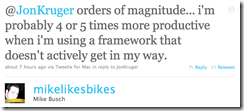
One point I need to make is I’ve seen a few of these discussions and often they become Rails v. C#/.Net, which isn’t really a fair comparison because Rails is a web framework. To go apples to  apples, you need Screen shot 2010-08-04 at 11.01.34 PMto compare Rails to ASP.Net MVC, not .Net in general. You wouldn’t compare WebForms or WPF to Ruby or Python, would you? (You shouldn’t compare WebForms to much of anything…but I digress.)
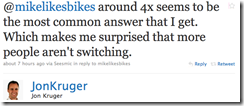
So, Jon asked a pretty valid question: Why don’t more people switch? Since I come from a .Net background, I’ve really only seen this debated as it pertains to .Net.

For a number of the arguments around the IDE, Intellisense, Static v. Dynamic typing, there are plenty of other blogs that have covered this, here’s a recent one I really liked: Ruby is Scary.

For my quick entry here, I’ll say this…I can have VIM or TextMate open and have a couple tests written before the VisualStudio splash screen has closed. Also, those two tools have yet to throw an “Out of Memory” exception on me, can’t say the same for Studio.

And I don’t really miss intellisense.

On with the show…

On the heels of Jon’s question Bill Sempf jumped in. As a bystander, Bill was very much representing the average .Net dude, and the arguments I’ve heard from the average .Net dude. (Bill has looked into Ruby, we’ve paired writing Ruby. That’s not really the point here, though.)

Ruby, the Average Dev, and the Complex System

@JonKruger: That's not my problem. I just don't think that 80% of the dev teams out there can handle coding in Ruby. (link)

That was Bill’s entry to the discussion, and I’m not sure I can disagree with him. However, I’m going to be snobbish and self centered and say I want to work with the 20%. If you’re in the 80% and can’t code Ruby…or Python, or F#, or any other language you have to learn…I don’t want to work with you. You can stay in “The Enterprise.”

@JonKruger: My point is those stories are told by top-tier devs, and not everyone is one of those. (link)

Again, tough to disagree with Bill’s assertion here. Not everybody is a rock star, and that’s cool. If you’re a budding rock star, you’ll be able to write some effective Ruby code.

In between those tweets were a few others, mainly around supporting complex systems using Ruby. Personally, I haven’t written a large scale application in Ruby, so I can’t lean on any experience here in writing the typical central Ohio “claims app” in Ruby.

What I have done with it has worked well. So my first counter to Bill’s argument on the complex systems: Use it where it fits. Ruby brings a great set of DSLs to the table for testing, web frameworks, and testing. Yeah, said it twice. Year one of Codemash (Jan of ‘07) I listened to Neal Ford talk about DSLs to help write your applications and Polyglot programming. Using Ruby to support your app – to write build scripts, tests, POC web sites – falls right in on the polyglot thing.

On the testing side, I’d much rather read a batch of RSpec tests than a batch of nUnit tests. Cucumber is already helping my current team get through some testing issues. Let me repeat that: I’m using Cucumber in a .Net environment RIGHT NOW to help the team get better test coverage on their application.

Learning a New Language

@JonKruger: There is a difference between learning the language, and being productive in it. (link)

I’m in total agreement with Bill here. Which is why I’m such a big fan of the incremental approach to using Ruby on your projects.

Great place to start: use Rake as your build script. I’ve done this for a couple years now, it’s a great way to dip your toe into Ruby, get comfortable with the language and a few of its concepts without really getting in on your production code. On the .Net side, use Albacore with Rake and you’ll have a build script in no time.

Next up you can start writing some tests in it. That’s a pretty good way to pick up a new language, anyway. And with the nice testing tools with Ruby, you can learn a new language and ease some testing pain.

But, the main point here, don’t be afraid of picking up a new language. How many do you know already? If you’re a web developer, you probably already know Javascript, CSS, HTML, C# (or some back end language), a little SQL, and a healthy dash of XML. Picking up another one isn’t going to be too difficult.

Essence v. Ceremony

I first heard this from Neal Ford, possibly at eRubyCon a couple years back. But, Stuart Holloway had a great blog post about it prior to when I heard Neal speak.

To me (and many others), Ruby gets to the essence of what you’re after quickly. I find myself working within it’s idioms easily, not fighting them constantly with adapter patterns, dependency injection, and ORMs. I find that my tests flow naturally from the various testing tools I use in Ruby, and the code that makes those tests pass benefits from that.

So, to Bill’s point, maybe Ruby isn’t ready to have average devs write big, complex, “enterprise” systems in it. But, it is ready to support what you’re writing today. Right now. Why not give it a try?

Unless you’re afraid of learning…

Tuesday, August 3, 2010

3 Things to Help That Presentation Go Better

I recently gave two presentations at Codestock. One on Kanban that I’ve given a number of times and is well rehearsed, and another on IronRuby that I’d never presented before. I had given a similar talk, but a good bit of this one was new. Since I hadn’t practiced the IronRuby talk too many times, it didn’t go as well as I’d had hoped.

There’s the first sign I was going to have trouble, I hoped it would go well. The Kanban talk I knew would go well, not so much with the IronRuby talk. I had some time issues in preparing, had a number of other events I was was participating in, but none of that mattered to those people in the room with me in Knoxville while I did an under prepared presentation.

Here are three things you can do to save yourself the same fate I had in Knoxville.

1. Un-busy those slides!

Yeah, drop the bullet points, the animations, the cool stuff that PowerPoint or Keynote will let you do and just keep it simple. I mean, who’s telling this story? You or some software program that just needs you there to hit the “Next” button?

I was recently at a national/international level conference and a fairly well known speaker was giving a talk, but this person’s slides had all kinds of images and animations and bullet points. They had crammed so much info on each slide that a number of their headings were lost in the curtaining surrounding the screen. As an audience member I had a poor user experience, and I can’t recall the topic of the talk because I was so distracted by the horror that was on display in their slide deck.

Simplify. One image per slide is a technique I use often. Use that image to support what you’re talking about rather than BE what you’re talking about. Keep the animations low, one or two per slide is plenty. You don’t want to distract your audience, you want them listening to you.

The last point on un-busying your slides, I’m sure a few of you are thinking, “But when I upload my slide deck, nobody will know what the main points of the talk were.” That’s fine, put the supporting points to the slide in the speaker notes, then a downloader will have a good idea what you were talking about…in the presentation they should have attended. (Because you were that awesome!)

2. Practice, practice, practice!!

Give your presentation to the wall of your office a few times. Set up a few of your kid’s (or your own) stuffed animals and regale them with the wonders of TSQL. Give it to some colleagues in an informal lunch and learn. But, practice it a number of times. You want to be comfortable with the flow of the presentation and the points you want to make on each slide.

You can add speaker notes to help you through, and jog your brain on some points you’d like to make, but you want to practice enough that you’re comfortable to give a good talk without those notes. Because…

Let’s say – hypothetically – you own a MacBook Pro and an iPhone and you’re going to use the wonders of the Apple Corporation to help you give a presentation. You’re going to use the phone as your presentation remote and it’ll show you those bullet point, memory joggers mentioned above. And because it’s all Apple, all the time…IT’LL JUST WORK! But – again, hypothetically – something is wrong with the wireless network and for some reason the phone doesn’t want to connect to an ad hoc network on your laptop. What then? What of those memory joggers? The notes? Well, you will have practiced enough that this will barely even slow you down.

3. Practice those code samples

Yes, more practice. But with good reason.

Live coding can make or break you…it usually breaks me. I’ve bored enough people to tears with my live coding, that I rarely do it. I have some colleagues that are awesome at live coding demos. Somehow they’ve mastered the art of saying one thing and typing another. I don’t have that gift…just like I don’t have the gift of being able to hit a fastball, the gift 4.3 speed, or the gift a 103 MPH slap shot. But, I digress.

Practice those coding samples. I mean, as developers were in this to code anyway, just do the same code over and over so you can give the presentation without a hitch. I read a great line the other day, and though it applied to development in general, it definitely fits here: Novices will practice until they get it right, experts will practice until they never get it wrong. When it comes time to do a code sample in front of 40 developers, you’re going to want to be an expert.

That’s all there is to it

So, in review…

  1. Keep it simple
  2. Practice the presentation
  3. Practice the code samples
  4. And, um, have fun!

Yes, it’s a bit of work to put on a presentation. But when it comes time to deliver that presentation, the people watching you are giving up part of their day to spend with you. Respect those people and that hour of time of theirs that they’re giving to you.

Saturday, July 31, 2010

IronRuby: Rake, Albacore, and you

In my post about setting up to run Cucumber with IronRuby, I included steps to install Rake and Albacore, but didn’t use them. In this post, we’ll put them to use.

RakeUsing Rake in .Net isn’t really a new idea, and a number of people have been using it for a while. I’ve used rake to compile and run the tests on all my .Net projects for at least the last year. Before Albacore came along to make my Rake tasks easier, I was copying the set-up from the folks at Fluent nHibernate. (FNH has used rake to build as far back as I can remember it existing and is now utilizing Albacore as well.) Now with IronRuby in the mix, rake is going to take on even more fun in your .Net projects.

For my example I’m again going to use my TestingSeaPound project, and specifically the rake file I’m using in that project. Pop it open real quick, and we’ll look through it.

At the top, you’ll see the standard Ruby require statements. In this file we’re including rake, the task library for RSpec, Cucumber, the task library for Cucumber, and Albacore.

Following the required libraries are a number of tasks that are combining the tasks that are defined later in the file. This is a way keep your rake file nice and dry. Define each task as needed, combine them in a call such as task :spec => [:msbuild, :rspec] to reuse them in different situations. From the command line in the directory where this rake file lives, if I enter “rake spec” it’s going to build the code then run RSpec

The only task in this list to take note of is the :default task. That’s the task that will run if you’re at the command prompt and just enter the command “rake”.

MSBuild

Skip down to the line that includes msbuild do |msb|. That’s our first task definition, and in this case we’re using the Albacore library. The top line of that task that includes the path_to_command is needed to build a .Net 4.0 project. I believe a fix is in the works, and may already be in place, but when I set up this file this was the way to call the .Net 4.0 compiler.

The next two lines, properties and targets, should look pretty familiar to anybody who has set up a .Net build in the past using MSBuild or Nant. Here we’re just saying what configuration we want to compile in, and what our target build is. Following that I’m setting the verbosity to quiet to keep the command line output fairly small.

The last line should be fairly obvious, it’s the path the solution file. Since MSBuild is very good at picking up a solution file and building it, why fight it? Pass the solution to MSBUild and let it do its thing.

nUnit

The next task down is our nUnit test runner. This is again an Albacore task, and it’s just pointing the test assemblies at the nUnit console app.

These two tasks are the only Albacore tasks in the file, so here’s as good a place as any to let you know the magic going on under the covers with Albacore. It is in essence building the correct command line arguments for MSBuild and nUnit and then shelling out to run them. Now, there’s more work going on than just that, but that’s the bulk of if. Albacore is giving us a nice DSL to write .Net build tasks. I’m only using two, there are a lot more available.

One important note: to this point our rake file hasn’t required IronRuby. You can use Albacore to build your project and run .Net based testing suites with MRI, IronRuby isn’t a requirement. I know as a .Netter that may seem odd, but we’re really not leveraging the Iron part of IronRuby.

Yet…

RSpec

The next two tasks are both RSpec tasks, and they’re running rspec against our .Net app. The first task is the default runner where it outputs a period for each passing test, the second will output the describe blocks and spec names.

NOW we need IronRuby. Not so much for the rake task, but because RSpec isn’t going to be able to test our dlls without the Iron added to our Ruby.

Cucumber

The final two tasks are Cucumber tasks. The first outputs the standard cucumber output, with each feature and specification output in their full glory – minus line numbers because I turned those off with the –-no-source option. The second task outputs the cucumber specs very much like nUnit and RSpec do, with a period for each passing test.

Once again we need IronRuby. Since I’m using the Ruby version of Cucumber in this case, we need to add the Iron to get it to reach into our dlls and do its magic.

That’s all for the tasks required to build and run the tests for this sample application. If you pull down the code and go to the root of the project and enter “rake all” at a command prompt, you’ll build it and run each suite of tests in order. Give it a try.

Thursday, July 22, 2010

IronRuby at CONDG

Off the top, apologies for the rather dark color scheme. The slides I think I can change the contrast on a little and they’ll be fine, but I know better than to use a dark color scheme for my ide and/or text editor. I guess the editing of the config file in Rails was just all black, sorry about that. (On the config side, you didn’t miss much, though.)

HOWEVER! :)

I just uploaded a PDF of the slides and you can look at them in whatever color scheme really makes them pop! You can get it all here: http://github.com/timwingfield/TestingSeaPound/tree/CONDG

Not a total cop out, please take a look at the code sample if you want to see the complete test classes from the examples - both the nUnit and RSpec ones. The rails app uploaded is the same one I created in the presentation, complete with the poorly named controller.

Again, sorry for the dark background in places, but thanks for coming out to watch.

(And big thanks to Kruger for making me remember how much I miss AutoHotKey after moving to the Mac. Windows devs, download AutoHotKey as soon as you read this.)

Friday, July 16, 2010

IronRuby: 0 to Cucumber in 15 minutes

Screen shot 2010-07-14 at 8.50.18 PM

Once again, a 140 character (or less) “outburst” gets me in trouble with a follower and I end up with a blog post. This one is one I probably should  have written a while back. I’ve enjoyed working with IronRuby the last few months, so this little intro is long overdue.

First things first, you’ll need to install IronRuby. Head off to the download page, and click on your msi of choice and let the installer do its thing.

Since my goal here was to get cucumber ready to roll against some .Net assemblies, you’ll need to install a few gems. IronRuby comes with Ruby Gems already installed, so thankfully to install the ones you need you just need to type ‘igem install’ a few times.

Screen shot 2010-07-14 at 8.49.47 PM“Wait, what? igem? WTF?” Yeah, that’s one of the IronRuby-isms, putting an i on the front of a couple of commands. If you’ve done a bit of Ruby, you’ll have a little muscle memory to retrain, but it’s a small hurdle. (You’ll also type ‘ir’ instead of ‘ruby’ to run a script and ‘iirb’ instead of ‘irb’ to get to irb.)

So, on with our gem installing…

igem install rake

First install is rake. I’m not going to use it right away on the cucumber running, but I’ll use it at some point, I always do.

igem install albacore

Like rake, I’m not going to use this one right away, but I’ve found it to be the one must have gem if you’re using rake with your .Net builds and test runners. It just makes you life that much easier.

igem install rspec

I’m not starting out writing rspec in this example, but cucumber is going to use its matchers.

igem install cucumber –-version “=0.6.4”

This is the one we’re after for this example. Be sure to add that version command on there because IronRuby isn’t quite ready for the latest version of Cucumber. But, 0.6.4 is going to get the job done for us.

igem install iron-term-ansicolor

The first time you run cucumber, it’s going to advise you to install this gem to get color coding in the terminal window. Go ahead and do it now, and you skip that warning. (Or don’t, and check the message for yourself. ;) )

Now all you need is some features, some step definitions, and a dll to write it all against. As luck would have it, I have just that written up in a code sample that I just used at Codestock a couple weeks ago. (And also coming soon to an Ohio user group meeting near you…) Here’s the root of that project: http://github.com/timwingfield/TestingSeaPound

The features directory there is where you’ll find my cucumber samples and the dll they are running against. Download it and give it a shot. Once you get it downloaded, open the command prompt in whatever directory contains the features directory (not the actual features directory) and type:

cucumber features

Happy IronRubying!

Friday, May 14, 2010

Upcoming Speaking Events

As is normal for me this time of year, I’ve got a number of events that I’m attending to do a little speaking and a little learning. This round will take me to three states, but only one time zone (thank goodness).

Indy Tech Fest, May 22

I’ll be presenting on Lean Software Practices. We’ll go through the seven principles of Lean Software Development, and I’ll present some experiences with each as I’ve practiced Lean over the last few years.

Indy Tech Fest might not be too familiar to us here in central Ohio, because it’s outside our MS region. (gasp) But, the folks in Indy do a bang up job with their events, and they have a large, active .Net community. This is my second year venturing west to join the folks at Indy, and it was a great time last year.

The Path to Agility, May 27

This is the first Path to Agility conference, and it’s being put on by the Central Ohio Agile Alliance at the Arena Grand theater in the Arena District of downtown Columbus. They’re bringing in Ken Schwaber to keynote the event, so I am most decidedly on the undercard.

I’ll be presenting my Kanban experiences over the last few years. It’ll introduce Kanban and how to use it to deliver software. I’ll relay the good experiences and the bad experiences.

There is quite a line up for this conference, and there’s still space available. If you can get a Thursday off work, it’ll well worth the $100 to attend. There are some top notch local agile people presenting. (The Clippers are at home that night, stick around for some baseball.)

Central Ohio Day of .Net, June 5

imageThe “home” event. Can’t miss this one, it’s a great time every year.  Getting the Cincy, Dayton, and Columbus folks under the same roof has made for a great event the last two years.

I’ve been selected to give two talks this year. Upside, I’m giving two talks. Downside, it’ll cut into my hallway sessions.

The schedule isn’t out yet, so I don’t know which session fits where. I’m presenting a beginning IronRuby talk, where we’ll get it installed, bang out some ruby code, hit a few CLR objects, and possibly take a few whacks at a piƱata to bring the fun level down a little. The second talk will be the same Lean presentation I’m giving in Indy.

Codestock, June 25-26

image My second trip to Knoxville to get in on Codestock. This is a great event. It’s got .Net roots, but offers quite a bit outside the normal .Net conference sessions. There are a lot of choices to make on what to attend over the two days. They did move to downtown Knoxville this year, so I’m looking forward to the new venue.

I’m speaking twice here, as well. I’ll deliver a Kanban talk, and an IronRuby talk. The IronRuby talk is going to go a bit deeper on testing than the one I’m giving at CODODN.

An added benefit to Codestock is Wendy and the boys go along, and we turn it into a mini-vacation. So, I’ll get a little pool time in, which usually doesn’t happen at conferences not named “Codemash.”

Ohio User Group Tour, July 22, 27, 28

We’re going to IronRuby it up at the Columbus, Cincinnati, and Dayton user groups in July. This talk is going to go into testing our C# code with IronRuby, and what advantages there are to this. The reason the CODODN talk is the beginning talk is because I was scheduled talk for these user groups back in December. Since it’s roughly the same crowd, we’ll do the intro at Day of .Net and dive into the testing at the local user groups.

Expect to see some RSpec running against C#, Rails running on IronRuby, Sinatra running on IronRuby, and mabye we’ll get crazy and put a Rails front end on an nHibernate repository or something. All hell’s gonna break loose during this one!

If I survive all this, I’ll have like 3 weeks of summer to kick back and relax…

Thursday, May 6, 2010

Mongo Mapper: Spelling Matters

Added Mongo Mapper to my test Sinatra app today, and kept getting a gem not found error. All the examples that came up in my various Google searches had:

require ‘mongomapper’

After a reinstall of the gem and a few curse words, I tried a little experiement:

require ‘mongo_mapper’

That did the trick.

Tuesday, April 27, 2010

Lean Conference Recap

Last week I was an attendee and a speaker at the Lean Software and Systems Conference. It was three days of lean, kanban, and flow; and it really got the wheels turning on a few things.

Off the top, a quick warning: If you are a restaurant owner and you don’t usually set up a buffet line in your restaurant, pray that Mary Poppendieck is not among the first few patrons to your new set up. This situation happened at the speaker lunch, and as 50+ lean thought leaders (and me) lined up, Mary came out with, “You would think a restaurant with a buffet line would understand queuing theory!”

Overall, the conference was very interesting. It wasn’t the normal dev conference I’m used to attending. The audience was comprised of project managers and team leads much more so than it was of developers and engineers. It made for a much different dynamic…and dress code. A lot more khakis and golf shirts than cargo shorts and Star Wars t-shirts.

The sessions were pretty good, but this was year two for this conference. That combined with the relative newness of the whole lean software movement led to some overlap in session content. Not saying that’s a bad thing overall, just the nature of the situation.

As with any conference, the hallway sessions add to the whole situation. I saw a few familiar faces and met quite a few new folks, including three guys who had flown over from Sweden for the conference. (And got past the volcano that wreaked havoc on the speaker schedule all three days.)

The only real downer for me was I didn’t get to visit open spaces. I was opposite the open spaces on Friday, so I was preparing to speak or speaking during the first part of the morning. After that, we were tearing down the booth and getting to the airport for our flight home. Would have liked to have seen what came out of those open spaces.

I thought my own session went pretty well. I did 45 minutes of a kanban experience report, and got a few questions near the end. The room was pretty big, so it didn’t lend itself too well to creating the discussion this topic has for me in the past. But, I was video taped for the first time in my short speaking career, so when that link comes out I’ll be sure to pass it around. (After reviewing it to make sure my hair looks ok.)

It looks like next year is slated to be in LA. I’ll submit a topic again, but even if I’m not selected to speak I may have to attend. This isn’t a CodeMash I must-attend-as-long-as-I-have-a-pulse type situation, but more to see how this conference matures and drives lean and kanban forward.

Saturday, April 10, 2010

The Tool List from Kalamazoo X

Here is the list of tools that I mentioned (and some I forgot to mention) during my talk at Kalamazoo X.

Communication and Collaboration

  1. Basecamp
  2. AgileZen
  3. Google docs 
  4. Google sites
  5. Trac
  6. Bugzilla
  7. Tiddlywiki
  8. Pivotal Tracker

Source Control

  1. git
  2. github 
  3. mercurial
  4. bitbucket
  5. Subversion
  6. Tortoise SVN
  7. Google code
  8. unfuddle

Builder Servers and Continuous Integration

  1. Hudson
  2. TeamCity
  3. Cruise Control
  4. Cruise Control .Net
  5. Cruise Control rb

Text Editors

  1. Vim
  2. emacs
  3. e text editor
  4. textmate
  5. Notepad ++
  6. Scite

Command Shell

  1. Cygwin
  2. Powershell

Scripting Languages

  1. Ruby
  2. Python

Books

  1. Pragmatic Programmer
  2. Productive Programmer

Monday, March 29, 2010

On the Move to Pillar

It wasn’t that long ago I was announcing my move to Reflex, but I am indeed taking the career on the road again, this time to join the team at Pillar Technology. Officially, I’ll be on board at Pillar on April 1st…no foolin’.

I have to give a big thanks to Andrew at Reflex for putting enough trust in me to make a difference there. In the short time there, we instituted a number of changes that will help them going forward. In two short months, we dove into cloud computing with Amazon, github, basecamp, Kaban, threw VSS out the window, and strived for more communication and visibility in all our projects. We bit off a lot in a short time and got some good positive momentum out of all of it.

However, as with any job or company, changes happen that effect everybody there. In this case, the changes came much quicker than I expected, and the opportunity to join Pillar came up and was too good to turn down.

Change is never too easy, but I’m excited to be joining Pillar. I’m going to get to work with some familiar faces, and some new ones. I’m going to get to push further into agile and lean, and learn from some leaders in the industry. All in all, I think this is an excellent opportunity for me and my career.

And, thankfully, Lotus Notes wasn’t involved in the decision making process what so ever.

Sunday, March 28, 2010

Countdown to Kal-X

On April 10th I’ll be attending one of my favorite conferences, Kalamazoo X. This will be the second year for the X conference, a one day, one track, no code conference. Each session will be 30 minutes long this year, and there are some great speakers and sessions lined up.

I really enjoyed the one-track format of Kal-X last year, because everybody was in the same conversation. Since we had all been to the same sessions lunch became like a big open space, recap combo.

The non-coding part opens the conference up to more than just developers. There were managers, designers, marketers, and students there last year. It was a great mix, and lead to some great questions during the conference.

I’m going to take a half hour break from being an attendee to be a speaker this year, as well. I’m going to give 30 minutes on what tools your dev team should have to be more efficient and help you build higher quality software. There will be a few tools for the whole team, and a few suggestions for the individual to employ.

If you’re looking for a one-day conference that will get the wheels turning, I can’t recommend Kal-X enough.

Oh, and there’s this little brewery in Kalamazoo… :)